
FENTEK INDUSTRIES, INC. Sales:
Phone:
Fax:
E-Mail:
800-639-0710
928-639-0161
928-639-0551
Info Request
1042 N. Main Street, Cottonwood, Arizona, 86326 USA

Home

Ergonomic:
Ergonomic Keyboard
Ergonomic Mouse
3M Keyboard Tray
No Hands Mouse
Foot Pedals
Notebook Platform
Arm Support
Footrest

Pointing Devices:
Wireless Mouse
RollerMouse
Laser Trackball Mouse
3M Mouse
Evoluent Mouse
Trackball Mouse
Gaming Mouse
Pen Mouse

Specialty Keyboards:
Mini Keyboard
USB Keyboard
Programmable Keyboard
Point of Sale Keyboard
Trackball Keyboard
Touchpad Keyboard
Left Hand Keyboard
Wireless Keyboard
Wireless Computing
Logitech Keyboard
Illuminated Keyboard
Blank Key Keyboard
Water Proof Keyboard
Programmable KeyStick
Flexible Keyboard
Keypads
Genovation Keypads
RF Wireless Keyboard

Apple / Mac:
Mac Keyboard
Mac Mouse

Large Print Keyboards:
Large Print Keyboard
Large Print Labels
Big Key Keyboard

Assistive Computer Products:
Hands Free Mouse
Foot Switch
Keyboard Keyguard
Braille Keytop Labels

International Language Keyboards:
Arabic Keyboard
Farsi Persian Keyboard
French Azerty Keyboard
Hebrew Keyboard
Japanese Keyboard
Portuguese Keyboard
Russian Keyboard
Spanish Keyboard
Keytop Labels

Dvorak Keyboards:
Dvorak Keyboard
Dvorak Keytop Labels

Keyboard Enhancement Products:
Keyboard Protectors
Y-Adapters
Software Templates
"Panic" Keys
Novelty Keys
Replacement Keys

Custom Keyboard Products:
Custom Key Printing
Keytop Printing
Custom Keyboard
Keyboard Template

Secure Order Form

Information Request

Shipping Information

Warranty

Hands-Free Mousing

Footime Mouse for PC or Mac

Footime™
Foot Controlled
Mouse
for PC or Mac

Hands Free Mouse

No Hands™
Foot Controlled
Mouse
for PC or Mac


Foot Controlled No Hands Mouse

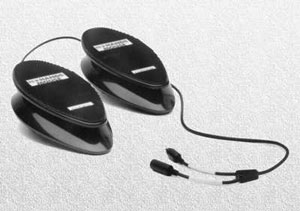
Avoid carpal tunnel syndrome and mouse induced Repetitive Stress Injury associated with desktop mice. The NoHands Mouse eliminates stress on the delicate hand-wrist area by moving mouse control to the feet. This prevents awkward wrist, elbow, and shoulder positioning before chronic pain develops. The NoHands Mouse also eliminates wasteful, repetitive "keyboard-to-mouse" hand movements increasing productivity. With the NoHands Mouse, you can have complete control of the cursor without having to take your hands off the keyboard, or your eyes off the monitor.

using no hands mouse
Features:
  • Plug and Play
  • Equipped with a "Y" cable so that you can use your existing mouse simultaneously
  • One pedal controls cursor movement. The other is for mouse clicks.
  • Compatible: Mac and Windows 98 and higher
  • PS2 with USB adapter included
  • Pedal dimensions: 10.0 inches long, 2.0 inches high, 4.0 inches wide
  • A six foot cable to you computer and over two feet of cable between the pedals
  • One year manufacturers limited warranty-repair or replace.
no hands mouse

Mouse Option Part Number List
Price
Special
No Hands Mouse - PC and Mac Compatible NHMPSU $349.99 $295.00

Using the Cursor Pedal:

The cursor pedal is mounted on a base that stays stationary on the floor. The pedal itself pivots on top of the base and will move in any direction you press your foot. This movement will be translated into cursor movement on the screen - you can move the cursor in any direction you desire, even draw circles, just as you can with a desktop mouse. The more firmly you press on the pedal in any direction, the faster the cursor will go. The ideal way to move the pedal is simply to wobble or rotate your ankle joint with a relaxed, natural movement.

The cursor pedal responds to subtle changes in pressure or direction. Unlike a desktop mouse, if you continue to exert pressure in one direction, the cursor will continue to move in that direction until you stop pressing, or until you lift your foot off of the pedal.

Using the Clicks Pedal:

The clicks pedal is also mounted on a base that stays stationary on the floor. The pedal itself is hinged on the base and only allows movement in an up and down rocking-like motion from heel to toe. The toe click is equivalent to the left button and the heel click is equivalent to the right button - left (toe) is single-click, right (heel) shows the contextual menu.

To use the clicks pedal, place your foot flat on the pedal:

  • To produce a single click, press down gently with your toe until you hear the click or see the click action on your screen.
  • To double-click, tap your toe twice.
  • To drag with the NoHands Mouse™, press down gently with your toe until your hear the click or see the click action on your screen. Keep the toe click depressed as you move the cursor with your other foot. Once the cursor reaches the desired location, release toe pressure on the click pedal. This is, of course, very similar to the way a desktop mouse operates.
  • The default action (both Windows and Mac) for the heel click is the display of a contextual menu popup. Your version of the mouse control panel that comes with your system software may allow you to reassign the heel (right-click) to a double-click, or some other action; or to reverse the click actions. There are also free and commercial third party programs that allow you to reassign clicks.
  • Click for Shipping/Handling charges.

    Every effort is made to ship Same Day order is received by 3:00 pm MST.

    To place an order please call us at 800-639-0710, 928-639-0161,
    or complete the Secure "Order Form" by clicking the Order Form button below.

    For more product information please email Info@Fentek-Ind.com or
    complete "InfoRequest" by clicking the Info Request button below.

    Order Form


    Footime™ Mouse

    Foot Mouse for PC or Mac

    Foot Controlled Hands Free Mouse

    Avoid carpal tunnel syndrome and mouse induced Repetitive Stress Injury associated with desktop mice. Using the foot controlled mouse eliminates stress on the delicate hand-wrist area by moving mouse control to the feet. This prevents awkward wrist, elbow, and shoulder positioning before chronic pain develops. It also eliminates wasteful, repetitive "keyboard-to-mouse" hand movements increasing productivity. With the foot controlled mouse, you can have complete control of the cursor without having to take your hands off the keyboard, or your eyes off the monitor.

    The foot controlled mouse is a two part system: one for cursor control ("slipper"), the other for mouse clicks and shortcuts (the "pedal"). The slipper shaped cursor controller is easy to use and efficient. With an elastic strap and velcro ends, it fits any size foot. The two-level pedal buttons mimic all regular mouse clicks but can also be programmed with any customized shortcuts (as many as 10 shortcuts for each program). It arrives preset with many popular shortcuts selected from widely used programs.

    Features:
    • 800 DPI
    • Two level ergonomic layout of control pedal
    • "Slipper" controls mouse cursor and button panel controls mouse clicks and scroll
    • Buttons on Panel:
      Left Click, Right Click, Double Left Click,
      2 Programmable buttons for defining any shortcuts/hotkeys
    • Scroll Wheel
    • Window on monitor shows all button functions
    • Preset popular shortcuts for popular programs
    • Slipper shaped and efficient cursor controller
    • Powered by user-friendly Neuratron™ software (included)
    • Built in sleep mode after 8 minutes; to wake up unplug "slipper" and plug back in
    • Compatible with Windows 98E, Me, 2K, XP, Vista; Apple Mac OS X 10.3 and later
    • Connection to computer is via USB Port
    • Slipper dimension: 7.0" x 4.25" x 0.875"
    • Button Panel dimension: 12.5" x  5.5" x 2.0"
    • Cord length 6 feet 4 inches
    • Slipper cord length 3 feet 2 inches
    • Mouse pad for slipper included  - 15.75" x 11.0"
    • Button dimension 1.5" in diameter

    Product Description Part Number Special
    Footime™ Foot controlled Mouse - USB Connector MFMUSB $199.00*

    *Free Shipping in Continental U.S. (excluding HI and AK)

    Every effort is made to ship Same Day order is received by 3:00 pm MST.

    To place an order please call us at 800-639-0710, 928-639-0161,
    or complete the Secure "Order Form" by clicking the Order Form button below.

    For more product information please email Info@Fentek-Ind.com or
    complete "InfoRequest" by clicking the Info Request button below.

    Order Form


    For additional Ergonomic Assistance see our selected Ergonomic Keyboards, the Finger Track Mouse, the 3M Ressaissance Mouse, or the Logitech Trackball.


    © 1997 - 2010 Fentek Industries, Inc.

    The "Key" to Your Success!